A LITTLE HELP GETTING STARTED
Your Butler user guide.
Save what you love. Plan what sounds good. Bring it all together in one grocery list.
01Set your preferencesMake Butler feel like you.
Start with your user preferences in your profile. Add your dietary preferences, allergies and cooking preferences to help Butler personalize its suggestions.
You can update your preferences anytime.
02Save your favorite recipesFrom a link, a photo or your own kitchen.
- Tap the + button in the bottom navigation.
- Choose how to add your recipe: paste a URL, write it from scratch or take a photo.
- Review the recipe, choose its category and save it to My Recipes.
From Instagram or TikTok
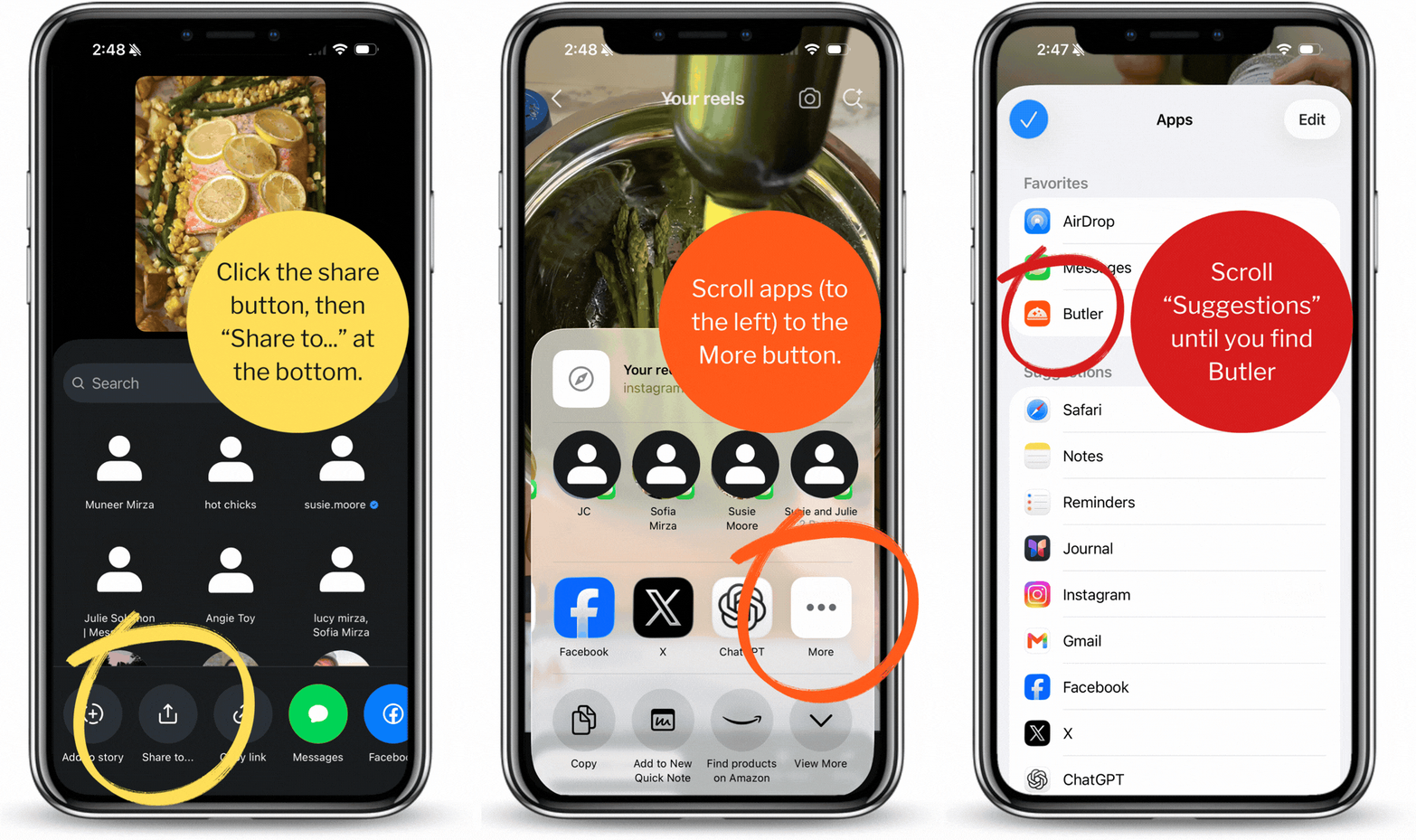
Open the recipe post and tap its share button. Open your phone’s sharing options (you may see Share to…), then choose Butler.
If Butler isn’t shown, you can copy the recipe link and paste it using the + button in Butler.
Watch how to share a recipe to Butler
Start with Butler Recipes
Need inspiration? Browse Butler Recipes and import the ones you’d like to cook into My Recipes. Over time, you’ll have a personal collection of recipes you love.
03Make a meal planOne dinner, a few meals or a whole week.
- Tap the + button in the bottom navigation.
- Select Create a meal plan.
- Choose recipes yourself, let Butler build the plan for you, or reuse a saved plan.
You don’t need to fill every day. Start with the meals you want help planning.
04Build your grocery listAdd a whole plan or just one recipe.
From a meal plan
- Open your completed meal plan.
- Tap the … button next to the calendar.
- Choose Add to Groceries.
From an individual recipe
Tap the + at the top right of the recipe card to add that recipe to Groceries.
Review your list before shopping and edit it as needed.
05Cook with what you havePut your fridge and pantry to work.
Add the ingredients you have to your fridge and pantry inventory, then use them as a starting point.
For a meal plan
- In the meal planner, choose to have Butler build the plan for you.
- Check Prefer my inventory.
Butler will prioritize what you already have. Review the recipes for any extra ingredients you may need.
For a custom recipe
Ask the Butler chat assistant to write a recipe using what you have.
“Write a dinner recipe using the ingredients in my inventory.”
06Find a recipe made for youA little inspiration, personalized.
Look for Made for You on the Home tab or AI Recipes in the recipe catalog. These are Butler’s personalized, AI-generated recipes.
Keep your preferences up to date, then save recipes you like to My Recipes so you can find them again and use them in your meal plans.
If you have allergies, always review the ingredients before cooking.
Still need a hand?
Tell us what you’re trying to do and we’ll help.
support@butlerkitchen.com